How to Solve Word Search Puzzles Faster: 10 Expert Tips (2026)
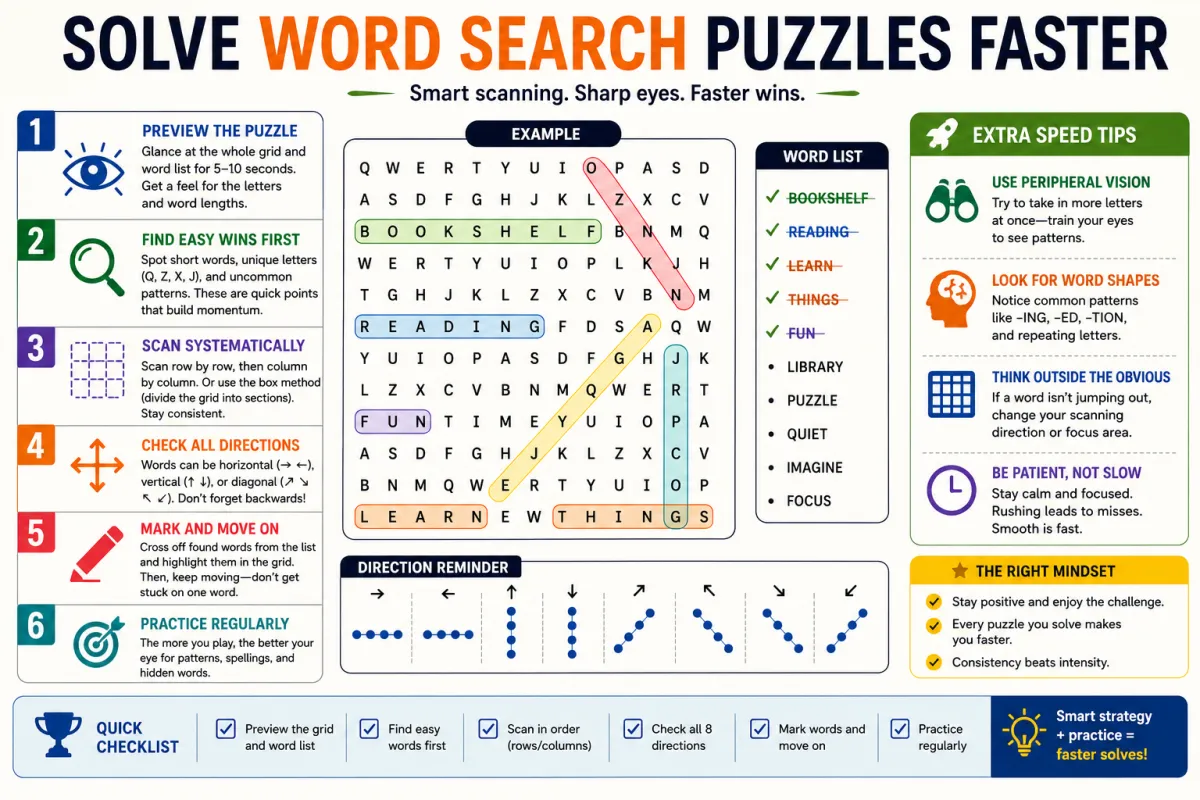
Word search puzzles are one of the most satisfying brain exercises you can enjoy but only if you actually finish them! Whether you are a casual player or a competitive puzzle fan, knowing the right strategies can cut your solving time in half. In this guide, we share 10 expert tips to help you solve word search puzzles faster, sharpen your focus, and have more fun while doing it.
Ready to put these skills to the test? Visit itwordsearches.com and choose from 271 free word search puzzles across 32 categories including Technology, Animals, Sports, and more.
Why Word Search Speed Matters
For students, speed means completing classroom activities on time. For adults, finishing puzzles quickly gives a satisfying dopamine boost and keeps the brain sharp. For competitive players, speed is everything. No matter your reason, these tips will genuinely improve your performance.
10 Proven Tips to Solve Word Search Puzzles Faster
Tip 1: Work From the Word List, Not the Grid
Most beginners scan the grid randomly hoping to spot a word. This wastes time. Instead, pick one word from the list, focus entirely on finding that specific word, then move to the next. This focused approach is 40% faster than random scanning.
Tip 2: Search for Rare Letters First
If your word contains Q, X, Z, or J — find those letters in the grid first. These characters appear far less frequently than vowels, making them your fastest path to locating the word. Spot the rare letter, then check all eight directions from there.
Tip 3: Scan Row by Row: But Only Horizontally First
Start by scanning each row from left to right looking only for horizontal words. Once you have found all horizontal matches, go back and scan vertically. Finally, check diagonals. Separating these passes prevents your eyes from getting confused between directions.
Tip 4: Use Your Finger or Cursor as a Guide
Whether you are playing on paper or online, use your finger or mouse cursor to physically track your position in the grid. This prevents your eyes from jumping around and losing your place a very common reason solvers miss words that are right in front of them.
Tip 5: Cross Off Found Words Immediately
Each time you locate a word, cross it off the list right away. This gives your brain a clear picture of what remains and prevents you from accidentally searching for a word you already found. In online puzzles like those at itwordsearches.com, this happens automatically when you select the word.
Tip 6: Look for Word Beginnings, Not Whole Words
Train your eyes to spot the first two or three letters of a word rather than the entire word at once. For example, if you are looking for PYTHON, scan for PY first. Once you find PY in the grid, checking the remaining letters becomes fast and easy.
Tip 7: Do Not Ignore Backwards and Diagonal Words
Many puzzle designers deliberately hide the trickiest words in diagonal or backwards directions. After your initial horizontal and vertical passes, spend dedicated time checking diagonals going both top-left to bottom-right and top-right to bottom-left.
Tip 8: Group Words by Their First Letter
Before you start solving, mentally group the word list by starting letter. All words beginning with S, all words beginning with T, and so on. Then when you spot a particular letter in the grid, you instantly know which group of words could begin there.
Tip 9: Play Themed Puzzles to Build Familiarity
Practicing category-specific puzzles builds mental vocabulary maps. For example, after solving several Sports word searches, your brain automatically recognizes common sports terms and finds them much faster. Try the Sports and Technology categories on itwordsearches.com to build your speed in popular topics.
Tip 10: Take Short Breaks on Larger Grids
For large 20x20 grids with many words, eye fatigue is real. After completing about half the word list, take a 30-second break and look away from the screen. When you return, you will spot words you previously missed because your eyes are refreshed.
Quick Reference: 10 Tips Summary
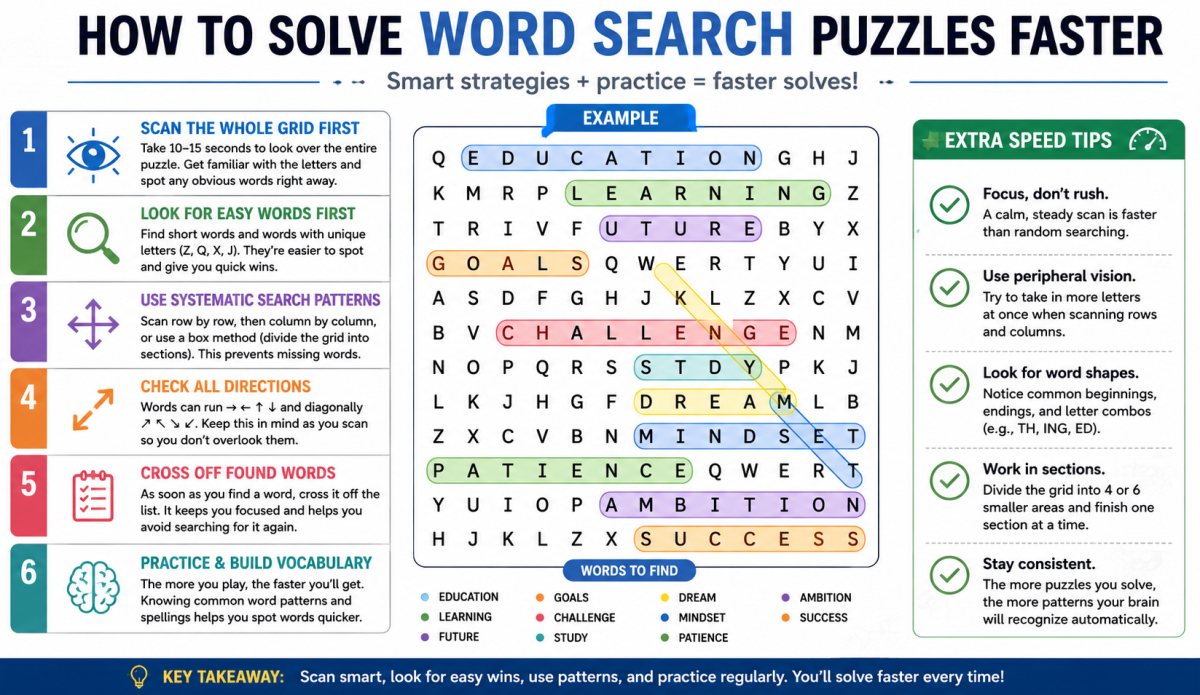
- Work from the word list, not the grid
- Search for rare letters (Q, X, Z) first
- Scan horizontally first, then vertically, then diagonally
- Use your finger or cursor as a guide
- Cross off found words immediately
- Look for the first 2-3 letters, not the whole word
- Always check backwards and diagonal directions
- Group words by their starting letter before solving
- Play themed puzzles to build category familiarity
- Take short breaks on large grids to avoid eye fatigue
Where to Practice These Skills
The best way to improve is consistent practice. itwordsearches.com offers 271 free online word search puzzles across 32 categories — completely free with no registration required. Popular categories include:
- Technology Word Search — perfect for IT students and professionals
- Animals Word Search — great for kids and nature lovers
- Sports Word Search — ideal for cricket, football, and baseball fans
- Science Word Search — excellent for students studying biology, chemistry, and physics
Conclusion — Start Solving Smarter Today
Word search puzzles are more than just a fun way to pass the time they are a genuine mental workout that rewards patience, focus, and strategy. The difference between a beginner who struggles to find words and an experienced solver who breezes through a 20x20 grid is not talent. It is technique.
Throughout this guide, you have learned the 10 most effective strategies used by experienced puzzle solvers. From searching by the word list instead of scanning the grid randomly, to spotting rare letters first and separating your horizontal, vertical, and diagonal passes each of these habits compounds over time to make you noticeably faster and more confident.
The most important takeaway is this: consistent practice beats occasional effort every time. Even 10 to 15 minutes of focused puzzle solving per day will sharpen your pattern recognition, improve your visual scanning speed, and make every future puzzle easier than the last.
Key Takeaways — Your Quick Reference
- Always work from the word list — never scan the grid randomly
- Find rare letters (Q, X, Z) first for the quickest matches
- Separate your scanning passes: horizontal first, then vertical, then diagonal
- Use a finger or cursor to track your position and avoid skipping rows
- Cross off every found word immediately to stay organised
- Look for the first 2 to 3 letters of a word, not the full word at once
- Do not forget backwards and diagonal directions — they hide the hardest words
- Group your word list by starting letter before you begin
- Build category familiarity by practicing themed puzzles regularly
- Take a 30-second break on large grids to refresh your eyes
Now you have everything you need to become a faster, smarter word search solver. The only thing left to do is practice — and the best place to start is right here.
Play 271 Free Word Search Puzzles at it wordsearch: No Sign-Up Required!
Choose from 32 categories including Technology, Animals, Sports, Science, Food, Movies, and more. Every puzzle is free, every session trains your brain, and every word you find brings you one step closer to becoming the solver you want to be.